
The using statement is a poweful utility for automatic disposal of unused resources.
The base implementation works like this:
using (var ch = new CustomHandler())
{
    /* Do something with ch */
}
The using statement is useful for preventing memory leaks by handling unmanaged resources like:
- Close files that are no longer being used
- Close database connections
- Handle HTTP Client termination
In order to use the using statement for a given class, the class must implement the IDisposable interface:
class CustomHandler : IDisposable
{
    public void SayHello()
    {
        Console.WriteLine("Hello World!");
    }

    public void Dispose()
    {
        Console.WriteLine("Handled dispose!");
    }
}
The automatic disposal can be verified by throwing an exception in the SayHello method.
class CustomHandler : IDisposable
{
    public void SayHello()
    {
        throw new Exception("Something went wrong!");
    }

    public void Dispose()
    {
        Console.WriteLine("Handled dispose!");
    }
}
I created a new class Main that creates an instance of CustomHandler.
Without Using
First test, no using.
public class Main
{
    public void LearnUsing()
    {
        var ch = new CustomHandler();
        ch.SayHello();
    }
}

var m = new Main();
m.LearnUsing();
The exception is thrown and the process is terminated as expected, but no resources were disposed.
Unhandled exception. System.Exception: Something went wrong!
Process finished.
With Using
public class Main
{
    public void LearnUsing()
    {
        using (var ch = new CustomHandler())
        {
            ch.SayHello();
        }
    }
}

var m = new Main();
m.LearnUsing();
This time around the resources are disposed sucessfully.
Unhandled exception. System.Exception: Something went wrong!
Handled dispose!
Process finished.
Manual Disposal
By this point you probably asked yourself a question, why not use Try-Catch-Finally block? That works too, but Try-Catch does not dispose resources. It only handles errors.
In order to dispose resources in Try-Catch you need to manually call the dispose method:
var ch = new CustomHandler();
try
{
    ch.SayHello();
}
catch (Exception ex)
{
    /* Handle exception */
}
finally
{
    ch.Dispose();
}
The using statement on the other hand calls the Dispose method automatically.
Using in Existing Classes
As mentioned, any class that implements the IDisposable interface can be used within the using block.
FileStream
using (FileStream fs = new FileStream("greetings.txt", FileMode.Open))
{
    /* Write to file */
}
HTTPClient
public async Task LearnUsing()
{
    using (var httpClient = new HttpClient())
    {
        var response = await httpClient.GetAsync("/api/getData");

        if (response.IsSuccessStatusCode)
        {
            /* Handle response */
        }
    }
}
Just make sure you prefix the call to LearnUsing with the await keyword as it now returns a Task.
await m.LearnUsing();SQL Connection
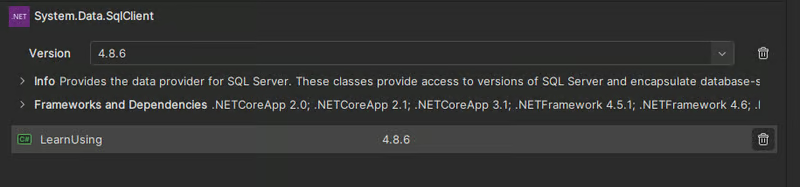
The using statement is also used when executing database queries without using any frameworks. To get started, install System.Data.SqlClient package via NuGet package manager and import it as a dependency.
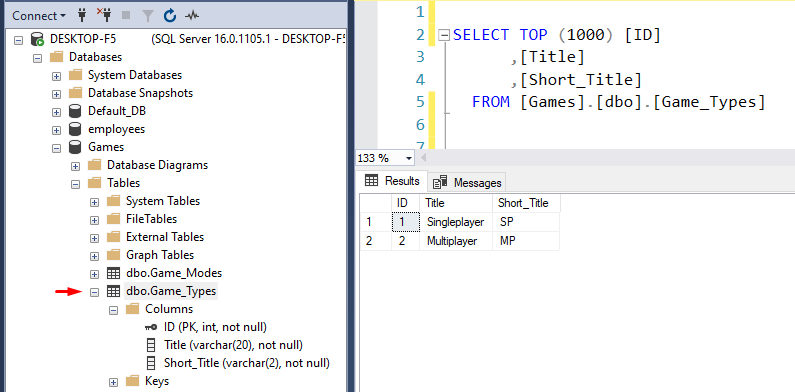
Then setup a connection string to your database. For this I created a local database via SQL Server.
string connectionString = "Server=;Database=;Integrated Security=True;";
string connectionString = "Server=DESKTOP-F5;Database=Games;Integrated Security=True;";
Now using a combination of using statements:
- Establish a connection with the database with SqlConnection
- Execute SQL Query with SqlCommand
- Read the response from the Table with SqlDataReader
Here you can see how to nest the using statements.
string connectionString = "Server=DESKTOP-F5;Database=Games;Integrated Security=True;";

using (SqlConnection connection = new SqlConnection(connectionString))
{
    try
    {
        await connection.OpenAsync();

        string sqlQuery = "SELECT * FROM Game_Types";
        using (SqlCommand command = new SqlCommand(sqlQuery, connection))
        {
            using (SqlDataReader reader = await command.ExecuteReaderAsync())
            {
                while (await reader.ReadAsync())
                {
                    Console.WriteLine(reader["Title"]);
                }
            }
        }
    }
    catch (SqlException ex)
    {
        Console.WriteLine(ex.Message);
    }
    catch (Exception ex)
    {
        Console.WriteLine(ex.Message);
    }
}
Note: If you are using Entity Framework, the queries do not need to be wrapped with using. The DbContext class automatically disposes the resources.
For immediate disposal, the using statement can also be used inline without curly brackets.
using (var fs = new FileStream("my-file.txt", FileMode.Open))
    Console.WriteLine("File open!");
That is all I have for today. Do not forget to hit the follow button.